
5 min read
When Windows 11 arrived, many owners discovered their PC could not upgrade because of a missing TPM chip. The message was confusing, because the computer ran Windows 10 perfectly well. The TPM requirement felt like an arbitrary block, but it serves a real security purpose.
This guide explains what a TPM chip is, what it does for your computer, and why Windows 11 treats it as a requirement rather than an option. You will also learn how to check whether your PC already has one.
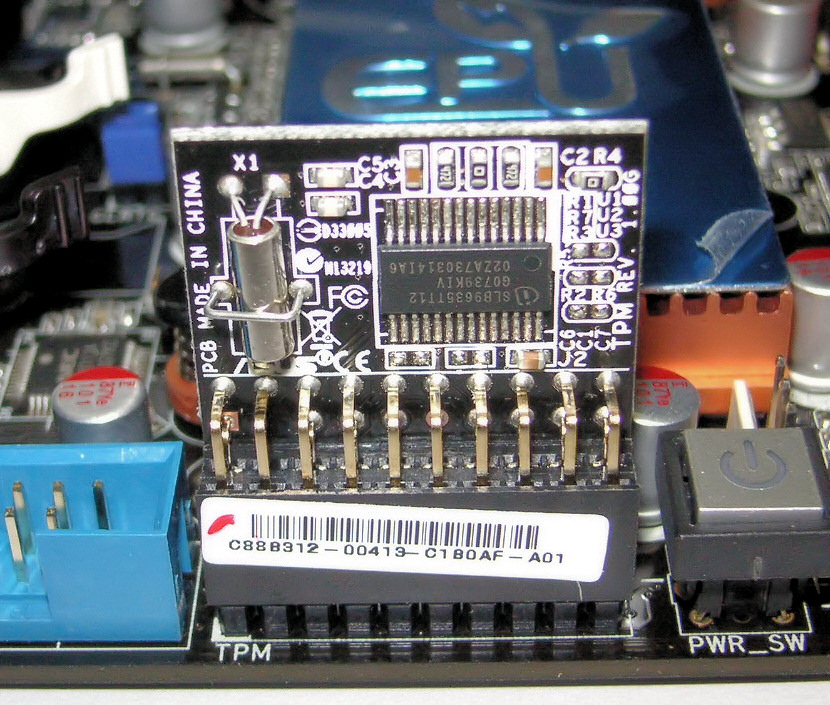
What a TPM Chip Is
A TPM, or Trusted Platform Module, is a small security chip that stores cryptographic keys and checks that the computer has not been tampered with. It can be a physical chip on the motherboard, or firmware built into a modern processor that performs the same job. Both forms are called TPM 2.0 in current computers.
The chip is designed to be hard to attack. Keys stored in the TPM cannot be easily read by software running on the computer, even if the operating system is compromised. That isolation is the whole point: secrets stay in the chip, not in ordinary memory where malware can reach them.
TPM chips have existed for years in business laptops, where they protect encrypted drives and corporate logins. Windows 11 brought the requirement to home computers, which is why many owners met the term for the first time.
What the TPM Actually Does
The most important job of the TPM is to guard disk encryption. When a drive is encrypted with BitLocker, the TPM holds the key that unlocks it, and it only releases the key if the startup process looks unchanged. If someone tampers with the boot process, the TPM refuses, and the drive stays locked.
The TPM also helps verify that the computer boots cleanly. It measures each stage of startup and compares the result with known good values. If a rootkit or a modified bootloader appears, the TPM can detect the change and block the boot, or report the problem to the operating system.
Finally, the TPM supports secure sign-in. Windows Hello and other credential systems can store keys in the TPM, so a fingerprint or PIN unlocks credentials that never leave the chip. This makes stolen credentials much harder to reuse on another machine.
Why Windows 11 Requires TPM 2.0
Microsoft made TPM 2.0 a requirement because software-only security had reached its limits. Malware that attacks the boot process or steals keys from memory can defeat ordinary antivirus, because it runs before or beneath the operating system.
The requirement also raises the baseline for every Windows 11 computer. When the hardware is guaranteed, Microsoft and app developers can build features that assume it exists, such as stronger encryption defaults and hardware-backed credentials. Without the requirement, those features would work only on some machines.
The decision was controversial, because it left many working computers behind. Microsoft accepted that trade-off, arguing that a modern operating system should assume modern hardware security.
The TPM requirement also affects virtual machines and dual-boot setups, because the guest system sees the TPM only if the host passes it through. If you run Windows 11 in a virtual machine, check the virtual machine settings for a virtual TPM option.
How to Check If Your PC Has a TPM
The easiest check is the Windows security processor details page, which shows whether a TPM is present and which version it is. You can also open the TPM management tool by typing the TPM command in the Run dialog, which reports the TPM version and whether it is ready for use.
If the tool reports no TPM, check the BIOS. Many motherboards ship with the TPM or its firmware version disabled by default, under names such as Intel PTT or AMD fTPM. Enabling that setting in the BIOS often satisfies the Windows 11 check without buying any hardware.
Some desktop motherboards have a TPM header where a physical module can be added. If your board has one and the firmware option is absent, a compatible TPM module may work. Check the motherboard manual for the exact module type, because TPM modules are not interchangeable between boards.
What to Do If Your PC Has No TPM
First, confirm that the TPM is really absent and not just disabled. Check the BIOS for the firmware TPM setting, and update the BIOS if the setting is missing. Many owners discover that a simple BIOS toggle solves the problem.
If the hardware truly has no TPM, the honest options are to stay on a supported older Windows version, replace the motherboard or processor, or buy a newer computer. Each option has a cost, and the right one depends on how old the machine is and what you use it for.
Avoid unofficial bypasses that skip the TPM check. They may install Windows 11, but the system will not receive the same support, updates can break the bypass, and the security features that depend on the TPM will not work properly. A bypass trades a clear requirement for a fragile setup.
A lost BitLocker recovery key combined with a TPM change can lock you out of your own drive, so store the recovery key somewhere safe before you change TPM settings. Print it, save it in a password manager, or keep it on a USB drive in a drawer. The key is the safety net for every TPM operation.
There is plenty more to try. The list below leads off with Motherboard Keyboard Not Working: Troubleshooting Guide — a good place to continue.
Related Articles:
- Motherboard Keyboard Not Working: Troubleshooting Guide
- PC Case Setup: A Complete Guide
- Dual Monitor Setup for Home Office Productivity
What is your take?
Share your experience or questions in the comments — especially if you have used this tech yourself.
Found this useful? Share it with a friend who would want to know.